

How We Communicate With Home

🔍 What is Arbor?
Arbor is our main college information and communication system for parents and carers.
Using Arbor, you can:
- 📩 Receive messages from UTC Leeds
- 📅 Check your child’s timetable, calendar and key dates
- 📊 View attendance information
- 📝 Access exam timetables (where applicable)
- 👥 Keep your contact details up to date
Logging In to the Parent Portal & Parent App – Arbor Help Centre
📱 Arbor App vs 💻 Parent/Student Portal – what’s the difference?
Both the Arbor Parent App and the Parent Portal show the same information.
-
📱 Arbor Parent App
- Downloaded to your phone or tablet
- Best for quick checks and notifications
-
💻 Parent Portal
- Accessed via an internet browser
- Useful if you prefer a larger screen
✅ You can use either or both — whichever works best for you.
Who can download the app?
Any guardian can download and login to the parent app providing their email address is on our System.
 This is the logo for the Arbor Parent App.
All students will automatically be registered for the Arbor Student App and Portal. They will be shown how to use it as part of their induction.
 This is the logo for the Arbor Student App.
🔑 Logging in for the first time
You’ll need:
- 📧 The email address you’ve provided during the application process
- ✉️ An invitation or password‑reset email from Arbor
If you can’t log in, this is often because we have the wrong email address.
Please contact reception if you need support.
💬 How we communicate with parents
📩 Arbor in‑app messages are our main way of communicating with parents and guardians.
This includes:
- 🏫 Important college updates
- 📝 Exam‑related information
- ⏰ Attendance or timetable messages
- ⚠️ Important reminders and urgent notifications
👉 Please make sure notifications are switched on in the app.
👥 Checking contact details
It’s very important that your contact details in Arbor are correct.
Please regularly check:
- 📞 Phone numbers
- 📧 Email addresses
- 👨👩👧 Which adults are listed as contacts
✅ This helps ensure:
- Messages reach the right people
- We can contact you quickly in an emergency
If someone linked to your child is not receiving communications, we may have the wrong email address. Please contact our reception so this can be updated.
📅 Viewing your child’s calendar
The Arbor calendar shows:
- 🗓️ Your child’s timetable
- 🎓 College events
- 📌 Key dates
This is the best way to stay organised and see what’s coming up.
📝 Exams and assessments
For students with exams:
- 🧠 Exam timetables are available in Arbor
- 📢 Any updates or changes will be shared via Arbor messages
We strongly encourage exam‑year parents to check Arbor regularly during assessment periods.
📊 Attendance & behaviour information
Arbor allows parents to view:
- ✅ Attendance information
- ⭐ Behaviour points (once these begin to be recorded)
This supports open communication between home and college.
✅ How often should I check Arbor?
We recommend:
- 👀 Checking Arbor once or twice a week
- 🔔 Keeping notifications switched on
- ⏳ Checking more frequently during exam periods
🆘 Need help?
If you:
- ❌ Can’t log in
- 📵 Aren’t receiving messages
- ✏️ Need to update contact details
- ❓ Can’t find information
📞 Please contact the UTC Leeds reception — we’re happy to help. [email protected]
Do I need any other Apps?
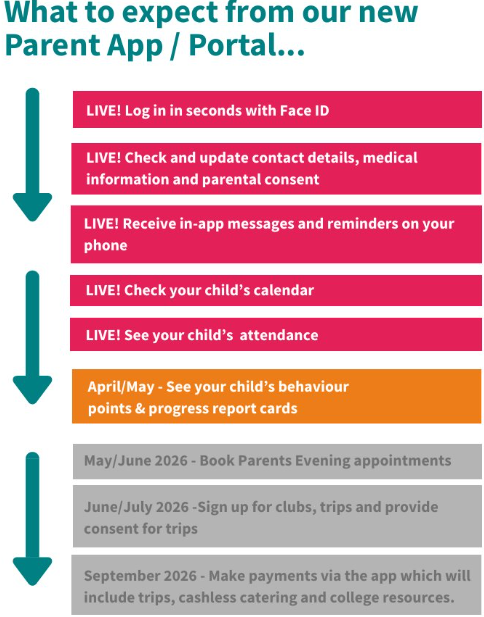
We are working towards Arbor being our only app but for now all payments and trips are managed via ParentPay. We are aiming to start using Arbor Pay by September 202
ParentPay: Simplifying School Payments - Access ParentPay
ParentPay is a secure and convenient app for managing college-related payments, from school meals to trips and activities. With ParentPay, you can:
- Make Payments Online: Pay for lunches, events, and other activities directly through the app without needing cash.
- Track Your Payments: View transaction histories and ensure all college-related expenses are up-to-date.
- Submit Permission Slips: A simple way to grant permission for your child to attend college trips and events.
ParentPay ensures that all payments are quick, easy, and secure, making school-related financial management stress-free for parents.
COMING SOON ON ARBOR!
Half-Termly Updates
Here is a link to our Parent & Guardian online notice board providing you with key dates, reminders and useful information as a parent of a UTC Leeds child. If you have any suggestions or requests for information please email us at [email protected].
👉Click here for our Parent & Guardian Information Board

Need Help?
If you have any questions or need assistance in setting up or using any of these apps, our parent support team is here to help. Please contact us at [email protected] or call 0113 123 4567.
At UTC Leeds, we are committed to working in partnership with parents to ensure your child’s success. These apps are designed to enhance communication and provide the support needed to help your child thrive both academically and socially.